



If you build or use agents, you will connect them to business systems. Soon you hit a choice. The vendor offers an official MCP server. A third party offers one too. Which do you trust with your work orders, and why does the third party even exist?
The stock answer says compare the tooling, weigh the security tradeoffs, decide per system. That answer comes from CRM, HR or accounting software, where both options already exist. In industrial software, the math is different.
First, congrats if you have the choice!
For most of us, the CMMS installed in 2009 never shipped an MCP server. Frankly, it never shipped a REST API either.
The whole official-vs-third-party debate assumes both exist. In CRM or accounting they probably do, so a it is reasonable to ask which door to walk through.
Industrial software never built the first door. Many of these products have been on the market for over a decade without shipping an API. Not a bad API, no API at all. The integration path is a nightly CSV export, a database view someone set up in 2014, or a support ticket asking politely for a data dump.
So "should we use the official Maximo MCP server or a third party's" is often a trick question. Where an official server exists at all, it will be far rougher than an official Slack or Jira one. These vendors are not racing to the frontier of agent tooling. They have not shipped the previous frontier yet.
When the official server does arrive, watch how it arrives
Industrial vendors will ship MCP servers eventually.
The actual question is how well. A company that took ten years to not ship a REST API will not suddenly ship a masterful MCP server. Expect the checkbox version, built so a sales rep can answer "yes, we support agents" on a deal. A thin set of tools, shaky auth, and descriptions an agent has to guess its way through.
How do we know? - we’ve seen most of them. Building a good MCP server is real work. It takes well-scoped tools, reliable auth, and descriptions clear enough that even “not the smartest” agent picks the right tool without a coin flip. A vendor who treated integrations as a support burden for a decade does not grow that muscle because a protocol got popular.
Even good official servers hand you four jobs
Suppose you are lucky! The server exists and it’s decent. You still have to put in some work, which nobody mentions in the launch post.
Running them
Many official servers ship as software you deploy and operate yourself, in your own cloud, on your own on-call rotation. Five systems, five servers to patch, monitor, and keep alive.
Filling the tooling gaps
Surveys of teams building agentic integrations found that official MCP servers were largely shipped for marketing: incomplete toolsets, shallow tool descriptions, often no built-in authentication. An agent is only as good as the tools it can call and the descriptions it can read.
Owning security
The same research found most teams building directly against MCP servers run into security problems, credential leaks chief among them. Every extra server is another place a token can go wrong.
Testing, forever
Roughly 70% of developers report that validating official MCP servers is complex and time-intensive. Now multiply by every server, and by every vendor release.
None of these is fatal alone. Together, across many systems, they are the quiet reason agent projects stall in month three.
One server in front of everything
Say three of your five target systems ship decent official servers. Now you meet the real problem.
You are running three servers, each with its own auth, its own tool design, its own quirks, its own failure modes. Your agent has to reason across all three as if they were one coherent surface. They are not. And the two systems that never shipped a server still hold the work orders your agent actually needs.
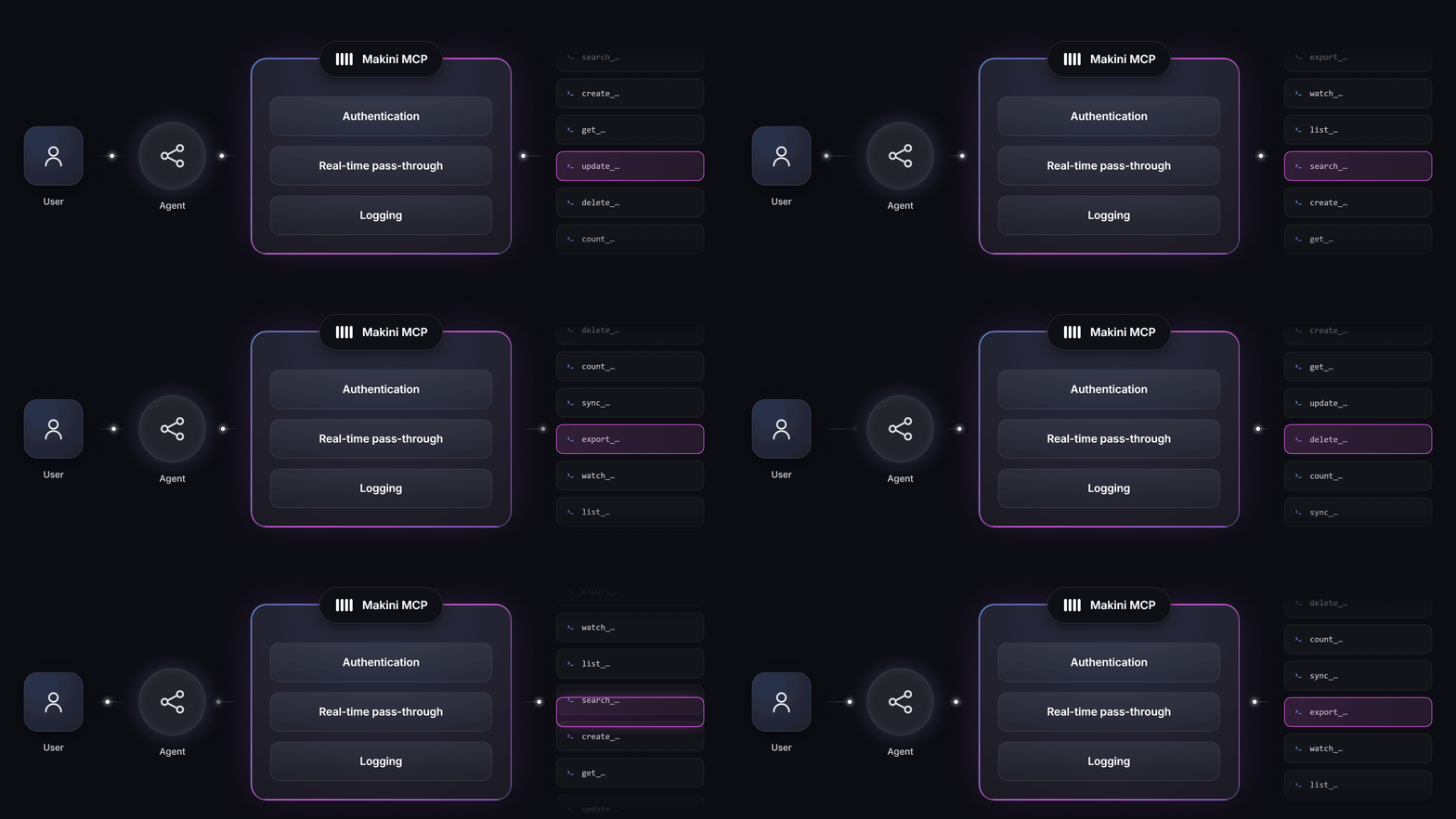
This is where a third-party MCP server changes the shape of the problem. With Makini, you connect a system once and reach it through one MCP server that Makini hosts, with the same login-based auth as the rest of the platform. Every connected system exposes the same four actions: search, get, create, update. One tool pattern everywhere, and each tool acts on that system's own objects and fields, in real time. Whether the system behind the server is SAP S/4HANA or a CMMS whose vendor has never heard the letters M-C-P is no longer your agent's problem.
Security stops being a per-server adventure too. Each connection carries its own token. An agent can only do what the underlying credentials allow in the source system, and every call is logged and searchable. The agent carries the same keycard as the user behind it, and every door it opens is on the log.
The value compounds with every system you add. One official server buys you one system, if it exists and works. One server in front of your connections buys the whole stack, including the systems that will never build a server of their own.
The part that surprises people: it is immediate
Connecting through a hosted MCP server is not the heavy lift people brace for.
You add one config block to Claude, n8n, LangChain, or any MCP-compatible client, and your agent runs. There is no multi-week integration project in the way, because you are not building the integration. You are pointing at one that already exists and is maintained. The hard, slow work of teaching a decade-old system a modern protocol has already been done.
The system that would have eaten a quarter of your roadmap becomes a connection you point an agent at this afternoon. That is the quiet luxury of not doing it yourself.
The takeaway
In most software, official vs third-party MCP is a real choice between two real options. In industrial software, "official" is mostly a door that was never built. Where the door does appear, check who has to hold it open. Usually you.
When your agent needs to touch many systems at once, and industrial agents always do, one server in front of everything is not the convenient option. It is the only one that scales.
If a system your product needs is not reachable yet, that is the gap Makini exists to close. Book a demo and bring the ugliest system in your stack.



.jpg)


